
How to Remove Google Autocomplete Suggestions (Step by Step)
Report a Google autocomplete suggestion yourself in four steps with screenshots, what Google actually removes, why it is rare, and what to do next.
 Written & reviewed byAnthony Will, Founder & CEOReputation Resolutions · 13+ year industry veteranUpdated November 2026 · 8 min read
Key takeaways
- You can report a Google autocomplete prediction yourself, for free: click Report inappropriate predictions under the suggestions, click the flag beside the prediction, pick a category and submit.
- Google removes a prediction only when it breaks an autocomplete policy or a valid legal ground applies, and it says it might not remove it even then. For a business name plus complaints, reviews, scam or lawsuit, removal through the form is rare.
- Predictions reflect real searches and vary by place, language and history, so check from more than one device before deciding what to do.
- When the form is not enough, the levers are the source content that feeds the suggestion and accurate content that changes what people find. A free analysis shows which route fits your suggestions.
Not sure your suggestion qualifies? Get a free analysis
A specialist checks your predictions and related searches on more than one device and location, tells you which ones Google's policies cover, and lays out the plan for the rest. Free and confidential.
In this guide
You can report a Google autocomplete suggestion yourself, for free, in about two minutes. But removal through Google's report form is rare for the suggestions that hurt reputations most. Google removes a prediction only when it breaks one of its autocomplete policies or a valid legal ground applies, and its own help page says it might not remove the prediction even then.
This guide shows every click with screenshots, which kinds of suggestions Google acts on, and what to do when the form is not enough. If you would rather have a specialist look at your situation first, we start with a free analysis of your autocomplete suggestions, and you can ask for it at any point.
What autocomplete is, in plain English
Autocomplete predictions reflect real searches done on Google. As you type, Google's systems look for common searches that match what you have typed so far, and they also consider the language, the place the search comes from, trending interest and, for signed-in users, past searches. Google also says predictions are not assertions of fact or opinion. That is why a suggestion can feel unfair and still not break a rule.
Because predictions vary by place, language and history, what you see may not be what a customer, investor or employer sees. Check from a signed-out browser and from more than one device or location before you decide anything.
What Google removes, and what it usually leaves alone
Google lists the predictions it does not allow: dangerous, harassing, hateful, sexually explicit, terrorist and violent or gory content, and vulgar language, plus a few feature-specific rules. The rules that matter most for reputation are the ones about named people. Google does not allow predictions that attach sensitive or disparaging terms to a named individual, including terms that expose private information in a way that may cause harassment, identity theft or fraud, and it does not allow predictions that accuse people or groups of serious malevolent acts without well-established supporting evidence. Google may make exceptions where the prediction has artistic, educational, historical, documentary or scientific context, or helps people understand current events.
Sexually explicit or vulgar terms next to a name
- What Google's policies say
- Sexually explicit content and vulgar language are not allowed
- How it usually goes
- Usually a fit for the report form
Harassing, hateful, violent or dangerous terms
- What Google's policies say
- Not allowed
- How it usually goes
- Usually a fit for the report form
Sensitive or disparaging terms tied to a named person
- What Google's policies say
- Not allowed, including terms that expose private information in a harmful way
- How it usually goes
- Often a fit
An accusation of a serious crime with no solid support
- What Google's policies say
- Not allowed without well-established supporting evidence
- How it usually goes
- Sometimes a fit
A business name followed by complaints, reviews, scam or lawsuit
- What Google's policies say
- Predictions reflect real searches, and Google says they are not statements of fact
- How it usually goes
- Usually not a fit
A suggestion driven by a real news story or court case
- What Google's policies say
- Exceptions can apply to current events
- How it usually goes
- Usually not a fit
Step by step: report a prediction yourself
These are the steps from Google's own help page, shown on a computer with the real screens. How to read the pictures. A red numbered circle marks something you click or type, in order. A dashed outline with a gray label is good to know and needs no click. The example search is a neutral one, and nothing was submitted.
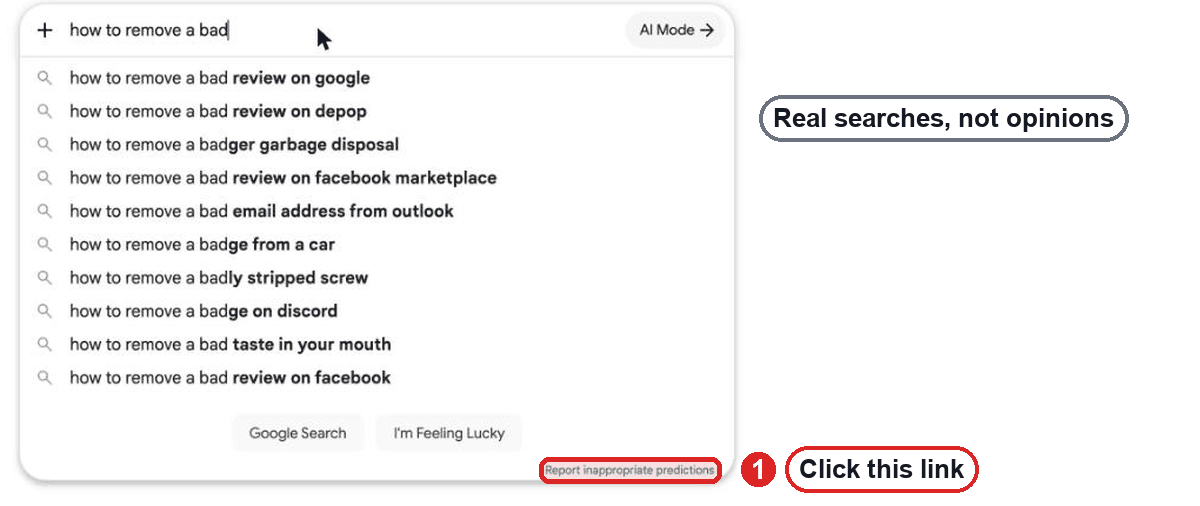
Step 1. Type the start of the search and click Report inappropriate predictions. Go to google.com and type what people would type, such as your name or business name. The suggestions appear under the box. Click the small link at the bottom right of the box (circle 1 in the picture).
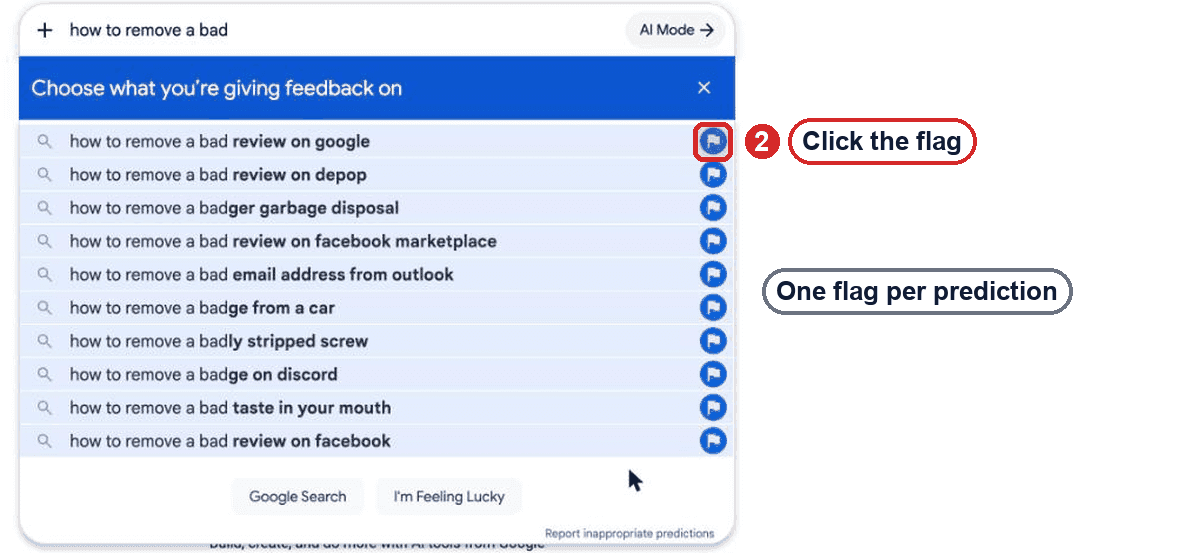
Step 2. Click the flag next to the prediction. A blue bar says Choose what you're giving feedback on. Click the flag beside the prediction you want to report (circle 2). Each prediction needs its own report.
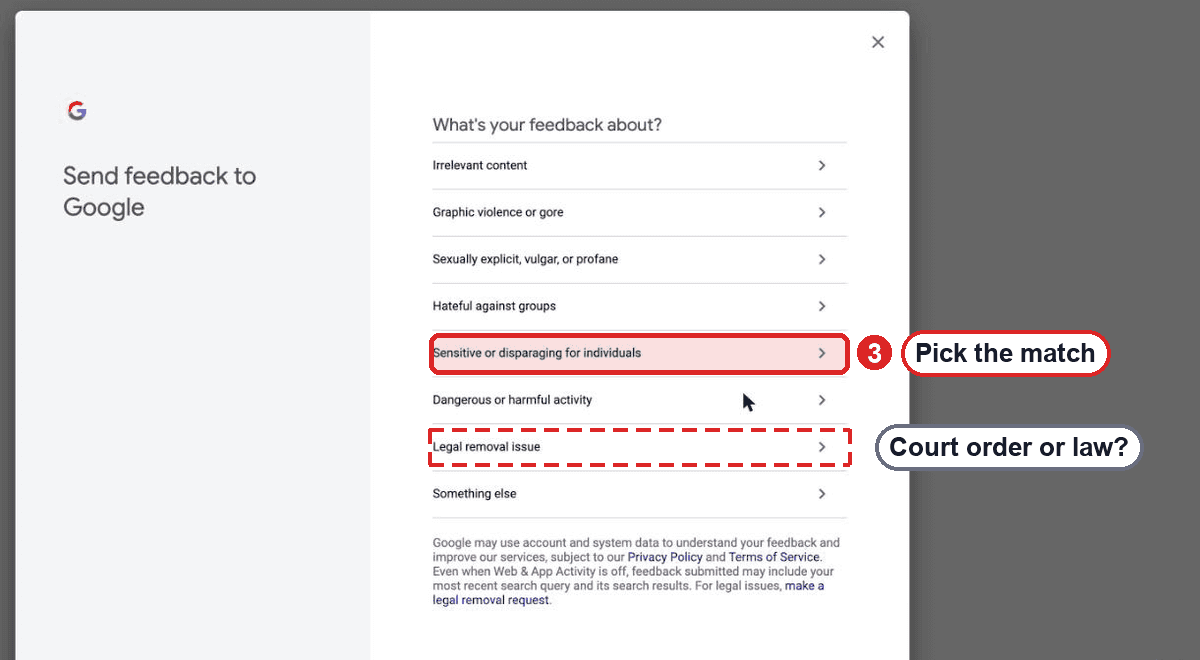
Step 3. Pick what your feedback is about. Google lists categories: Irrelevant content, Graphic violence or gore, Sexually explicit, vulgar, or profane, Hateful against groups, Sensitive or disparaging for individuals, Dangerous or harmful activity, Legal removal issue and Something else. Choose the one that matches the rule the prediction breaks (circle 3). If a court order or a law applies, the dashed-outline option, Legal removal issue, leads to Google's legal removal request.
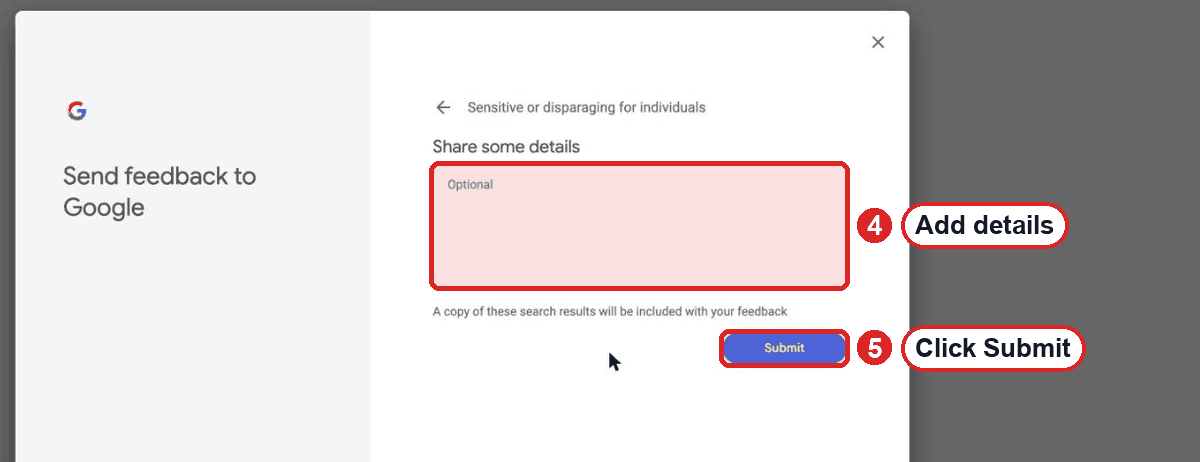
Step 4. Add details and click Submit. Say what the prediction is, who it names and which rule you think it breaks (circle 4). The box is marked optional, but a short, specific reason is easier to review than a blank box. Then click Submit (circle 5). Google says it looks at what you sent but might not remove the prediction.
If Google does remove a prediction, it removes that specific prediction and closely-related variations, not every suggestion that mentions you.
If a law or a court order applies
Google has a separate legal removal form for a prediction you believe is against the law. Choose Legal removal issue in step 3, or open Google's legal request form directly. Have the exact prediction text, the words you typed to see it, and any document that supports your claim, such as a court order. We are not a law firm and do not give legal advice, and a lawyer can tell you whether a legal ground exists in your case.
Why this route is rare for reputation problems
Most predictions that hurt a business or a person do not break a policy. They are a name followed by a word like complaints, reviews, scam, lawsuit or fraud, and they appear because people really search those words. Google's help page says predictions are not assertions of facts or opinions, so the report form usually ends with no change. In our experience, removal through the form alone is rare for these suggestions, and that is the reason so many people file a report and then see the same suggestion a week later.
Reports work best on the narrow set of suggestions that clearly break a rule, such as explicit, hateful or harassing terms attached to a name. If yours is one of those, file it. If it is not, spending your time on repeated reports is the wrong lever.
What moves a suggestion when the form does not
Find what feeds it. A suggestion is usually backed by a page: a news article, a forum thread, a review page or a court record that ties your name to the word. Where that page qualifies, removing or updating it at the source weakens the pattern. See our guides on removing a Google search result and removing negative news articles from Google.
Build accurate content about you. Authoritative pages that say the right things change what people find and, over time, what they search. This is gradual, so plan in months, not days.
Check every place the term shows. The search box on the Google home page, the search box on a results page, and the related searches shown after a search are different features. A term can be gone from one and still show in another.
Where we come in: a free analysis before you decide
If you would rather not guess, we start with a free, confidential analysis of your situation. A specialist checks the predictions and related searches for your name or brand on more than one device and location, documents each one, checks it against Google's autocomplete policies, and tells you plainly which have a removal ground and what the plan is for the rest.
For suggestions that qualify, we prepare the request and file it through Google's official channels, the prediction report and, where a legal ground exists, the legal removal request, then follow up and verify the result in each place. Where the prediction itself breaks no rule, we work the source content and build accurate content about you. Removal fees are due only after a removal is confirmed. The content work is scoped separately in writing.
| Your situation | Best first move |
|---|---|
| An explicit, hateful or harassing suggestion next to your name | Report it yourself with the steps above, and ask us if Google declines |
| A suggestion that exposes private details | Report it, and ask Google to remove the page that exposes the details through its personal information removal request |
| Your business name plus complaints, reviews, scam or lawsuit | Free analysis: the source content is the lever, not the form |
| A court has found a statement defamatory | Legal removal request with the order, and speak to a lawyer |
| Not sure which of these you are in | Free analysis |
Not sure whether your suggestion qualifies? Get a free analysis of your autocomplete suggestions. It takes a few minutes to ask for, and you will know which route fits before you spend time on forms. You can also read about the Google autocomplete removal service in full.
Frequently asked questions
Can I remove a Google autocomplete suggestion myself?+
You can report it for free. Type the start of your search, click Report inappropriate predictions under the suggestions, click the flag beside the prediction, pick a category and submit. There is no delete button. Google looks at the report but says it might not remove the prediction, and it removes predictions only when they break its autocomplete policies or a legal ground applies.
How long does it take Google to act on a report?+
Google's help page does not give a timeline for prediction reports. Predictions also update as search behavior changes, so a result can take time to settle. Check again from a signed-out browser, on more than one device, after you file.
Why do I see a suggestion that other people do not?+
Google varies predictions by language, location, trending interest and, if you are signed in, your own past searches. A suggestion can show for you and not for a customer, or the reverse, which is why a check on one device is not a reliable read.
Will clearing my search history remove the suggestion?+
No. Clearing your history or turning off personalization only changes what you see. Predictions for everyone else are still built from real searches.
What is the difference between autocomplete and related searches?+
Autocomplete predictions appear in the dropdown as you type, before you submit a search. Related searches and the People also search for block appear after a search. They are separate features, so a term can be removed from one and still show in the other.
What if the suggestion is true, like a real lawsuit or news story?+
Google's predictions reflect what people really search, and exceptions can apply to current events, so a suggestion tied to a real event usually stays. The lever is the source content, where it qualifies for removal or an update, and accurate content that changes what people find over time.
Does Reputation Resolutions charge for autocomplete analysis?+
No. The analysis is free and confidential. Removal fees are due only after a removal is confirmed in the placement, and any content or suppression work is scoped separately in writing.
Sources & references
Prefer we handle it?
Not sure your suggestion qualifies? Get a free analysis
A specialist checks your predictions and related searches on more than one device and location, tells you which ones Google's policies cover, and lays out the plan for the rest. Free and confidential.
Get my free analysisReady to See What AI Finds About Your Reputation?
Schedule your free, confidential consultation and we'll show you exactly where you stand across search engines, review sites, and AI platforms.